
Wiring IRC DIN Rail Modules: Difference between revisions
Created page with "In most cases, when you get a IRC cabinet, we will send you all necessary cables and everthing will already be wired properly for you. But in some cases you might want to add single modules or do the wiring yourself. This article shows you how to wire our modules correctly. == Warnings == left|80px '''Caution! This should be done only by experts with experience with the robot control.''' Turn off the power to the cabinet and unplug it from mains..." |
(No difference)
|
Latest revision as of 13:10, 3 December 2025
In most cases, when you get a IRC cabinet, we will send you all necessary cables and everthing will already be wired properly for you. But in some cases you might want to add single modules or do the wiring yourself. This article shows you how to wire our modules correctly.
Warnings

Caution! This should be done only by experts with experience with the robot control.
Turn off the power to the cabinet and unplug it from mains before changing any connections. Hot plugging modules or wires can cause damage!
If you add axis modules make sure they support the voltage of your cabinet. Your cabinet will always contain at least one 24V power supply for logic and motor power. If it also contains a 48V supply your motors likely run on 48V. Check the label of the motor module: Only if it says 48V or both 48V and 24V it is compatible to 48V. Modules that say 24V or nothing at all only support 24V controls. Non-axis modules, e.g. IO modules or inrush current limiter modules can be used with any motor voltage (use 24V for the digital inputs and outputs).
Reading the Pin Assignment

You can find the pin assignment on the side of each module (or check the next chapter). The assignment reads from left to right, when you look head-on at the pins:
Check the technical data sheets of the cable to see, which signal refers to which wire and match them to the module's pins accordingly.
Pin Assignments
-
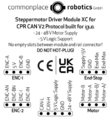 Steppermotor Driver Module XC
 -
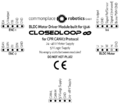 BLDC-Motor Driver Module
 -
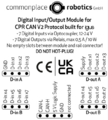 Digital Input/Output Module
 -
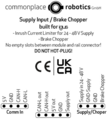 Supply Input / Brake Chopper Module
 -
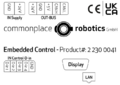 Embedded Control
 -
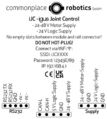 iJC - igus Joint Control


igus Cable Signals
Here you find signal tables for our most frequently used cables.
-
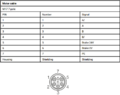 DLE904121457
 -
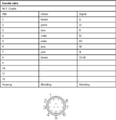 DLE904121458
 -
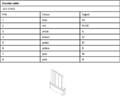 DLE904121460
 -
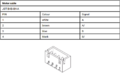 DLE904121461
 -
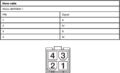 DLE904161278
 -
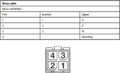 DLE904172362
 -
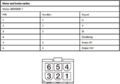 DLE904172363
 -
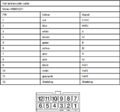 DLE904172365
 -
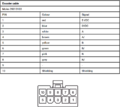 DLE904184369
 -
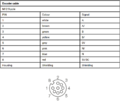 DLE904121456
 -
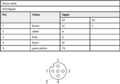 DLE904121452
 -
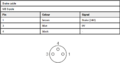 DLE904121453 DLE904121454


