
Math Tools App: Difference between revisions
m 1 revision imported |
mNo edit summary |
||
| (One intermediate revision by the same user not shown) | |||
| Line 1: | Line 1: | ||
[[File:MathAppFunctions.png|thumb|250px|link=Math Tools App]] | |||
Math Tools an open source python-based app that extends the igus Robot Control with occasionally needed program functions, mainly around math and timing. The app has the following purposes: | Math Tools an open source python-based app that extends the igus Robot Control with occasionally needed program functions, mainly around math and timing. The app has the following purposes: | ||
| Line 29: | Line 31: | ||
= Download = | = Download = | ||
Math Tools App: [https://github.com/CommonplaceRobotics/RobotControlApps/releases/download/V14-004_Upd1/MathTools.zip MathTools.zip] | |||
App package: [https://github.com/CommonplaceRobotics/RobotControlApps/releases GitHub Releases] | App package: [https://github.com/CommonplaceRobotics/RobotControlApps/releases GitHub Releases] | ||
Latest revision as of 08:03, 8 May 2026
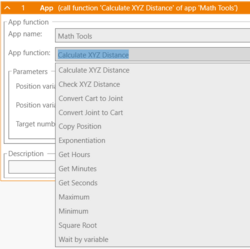
Math Tools an open source python-based app that extends the igus Robot Control with occasionally needed program functions, mainly around math and timing. The app has the following purposes:
- New functions can be quickly added on demand
- It lets us test rarely used functions before deciding to add them to the robot control software
- Very easy to extend base for program commands developed by customers
The Math Tools app is supported by iRC V14-004 and later.
Available Program Functions
Currently the following functions are provided:
- Kinematics:
- Forward kinematics: Convert joint angles to cartesian position
- Inverse kinematics: Convert cartesian position to joint angles
- Math:
- Calculate cartesian (XYZ) distance between two position variables
- Check cartesian (XYZ) distance between two position variables - to check whether a position is close to another
- Square root
- Exponentiation
- Minimum
- Maximum
- Copy position - Copies only selected components between position variables
- Timing
- Get time since start in seconds
- Get time since start in minutes
- Get time since start in hours
- Wait by variable (give the duration via a number variable)
Download
Math Tools App: MathTools.zip
App package: GitHub Releases
Source code: GitHub
Adding Functions
Please refer to the documentation and sample code for any questions regarding the app interface.
Adding your own functions is easy: 1. Open rcapp.xml with a basic text editor and add a new function definition with a unique ID, name and the necessary parameters 2. Open MathToolsApp.py and add a new function that does whatever you need, similar to the examples 3. In function _AppFunctionHandler add a new condition that checks for the ID of your app function. Call your function. 4. Zip your code, install it to the robot control and test it.