
Simulation

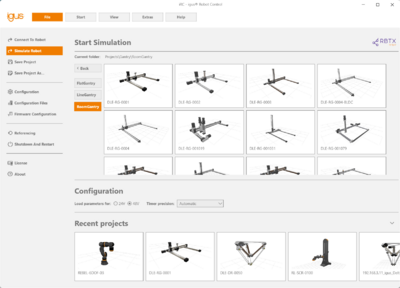
The iRC supports a full-fledged simulation mode, which allows testing and programming without needing the actual robot. You can test all interface features, like DIOs, Modbus and AppInterface, as well.
The simulation runs as a standalone background process on your PC. The iRC connects to this process, just like it would to a real robot.
Configuration
You can choose between the 24V and the 48V configuration. Both have different settings for max. speed as well as acceleration, which are defined in the Robot Configuration File. Choose the desired setting before clicking on the robot.
The timer precision defines the internal cycle time of the simulation. A higher value leads to a more accurate simulation, but also to higher CPU load.
- Automatic: Automatically chooses the best setting.
- Simulation: "Energy saving" mode. Good for most use-cases without stressing the CPU too much.
- Normal: Trade-off between "Simulation" and "High Precision".
- High Precision: Same cycle time as the target hardware. Will lead to high CPU usage.
- High Precision, Low Jitter: Same as "High Precision", but with a fixed, steady interval.