
Apps for the Robot Control: Difference between revisions
| (4 intermediate revisions by 2 users not shown) | |||
| Line 13: | Line 13: | ||
Note that apps may support being installed to both embedded control and simulation on PC or only one of them. This depends on whether the creator of the app has included binaries for both systems. | Note that apps may support being installed to both embedded control and simulation on PC or only one of them. This depends on whether the creator of the app has included binaries for both systems. | ||
= Minimal | = Minimal app examples and source code = | ||
As a starting point to develop your own robot control apps you can use our Minimal App (available for C++ and Python). These include a simplified API, documentation and examples. The examples show how to read and write variables, how extend the robot program with new functions and how to create a user interface that integrates into iRC/CPRog. | As a starting point to develop your own robot control apps you can use our Minimal App (available for C++ and Python). These include a simplified API, documentation and examples. The examples show how to read and write variables, how extend the robot program with new functions and how to create a user interface that integrates into iRC/CPRog. | ||
| Line 19: | Line 19: | ||
The interface will be extended with new functions in future. | The interface will be extended with new functions in future. | ||
= Math Tools = | |||
= App Selection = | |||
== Math Tools == | |||
[[File:MathAppFunctions.png|thumb|200px|link=Math Tools App]] | |||
[[Math Tools App|Math Tools]] extends the igus Robot Control with occasionally needed program functions, mainly around kinematics, math and timing. The app is open source and python-based so you can easily add your own functions as needed. | [[Math Tools App|Math Tools]] extends the igus Robot Control with occasionally needed program functions, mainly around kinematics, math and timing. The app is open source and python-based so you can easily add your own functions as needed. | ||
:[[Math Tools App]] | |||
<div style="clear:both;" /div> | |||
== Position Logger == | |||
The PositionLogger app adds basic functions for logging the robot's position to a CSV file. This is intended for testing and as an extendable example - with some Python skills you can log any info that is relevant to you. | |||
:[[Position Logger App]] | |||
== Socket App == | |||
= | [[File:SocketAppConfig.png|thumb|200px|link=Socket App]] | ||
The | The Socket App extends the robot control with a network interface for receiving and sending text-based messages. | ||
It can be used to let the robot exchange data with external devices like: | |||
* Other Robots | |||
* Object recognition cameras | |||
* Control Boxes | |||
* And many more! | |||
:[[Socket App]] | |||
<div style="clear:both;" /div> | |||
== Vision App == | |||
[[File:VisionJars.png|thumb|200px|link=Vision App]] | |||
The Vision App is created for 2D Object Detection. The app uses a standard USB camera which can be connected to your robot. [https://wiki.cpr-robots.com/images/8/88/VisionApp_Examples_EN.pdf This] | |||
document describes what the Vision App can be used for and what objects can be detected. | |||
:[[Vision App]] | |||
<div style="clear:both;" /div> | |||
[[Category:Apps]] | [[Category:Apps]] | ||
Latest revision as of 08:09, 8 May 2026
The app interface (since iRC/CPRog V14) allows custom extensions for the robot control. Apps can access and change the robot's state, add functions to the program editor and add user interface components for interaction and configuration.
The app interface is based on GRPC which supports many different programming languages. We have prepared sample APIs for C++ and Python with a minimal sample app that can be used as a base for new apps. See section Minimal App below.
Please note that the app interface still is quite new and does not provide all features like CRI or Modbus. We will extend it in near future.
You made a cool app yourself and want to share it with the world? Please contact us and we will make it accessible here!
Installing Apps
Apps come as ZIP packages. To install an app connect iRC/CPRog to the robot, then click "File" → "Configure Interfaces" → "Apps" → "Install" and select the ZIP package.
Note that apps may support being installed to both embedded control and simulation on PC or only one of them. This depends on whether the creator of the app has included binaries for both systems.
Minimal app examples and source code
As a starting point to develop your own robot control apps you can use our Minimal App (available for C++ and Python). These include a simplified API, documentation and examples. The examples show how to read and write variables, how extend the robot program with new functions and how to create a user interface that integrates into iRC/CPRog.
Download the source code and find the documentation on GitHub. The interface will be extended with new functions in future.
App Selection
Math Tools
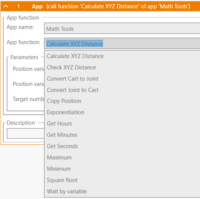
Math Tools extends the igus Robot Control with occasionally needed program functions, mainly around kinematics, math and timing. The app is open source and python-based so you can easily add your own functions as needed.
Position Logger
The PositionLogger app adds basic functions for logging the robot's position to a CSV file. This is intended for testing and as an extendable example - with some Python skills you can log any info that is relevant to you.
Socket App
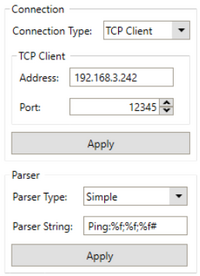
The Socket App extends the robot control with a network interface for receiving and sending text-based messages. It can be used to let the robot exchange data with external devices like:
- Other Robots
- Object recognition cameras
- Control Boxes
- And many more!
Vision App
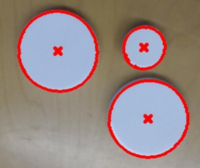
The Vision App is created for 2D Object Detection. The app uses a standard USB camera which can be connected to your robot. This document describes what the Vision App can be used for and what objects can be detected.